
Download AR Drawing: Anime Sketch – AR drawing, anime sketch, trace anime, free art app, drawing tool, anime art, drawing for beginners, drawing app, Android drawing software
Overview
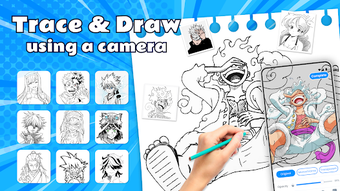
AR Drawing: Anime Sketch is a free Android application developed by AR Drawing Studio, designed to support users in improving their drawing abilities, particularly within the anime art genre. The software leverages augmented reality technology to overlay reference images directly onto the user’s physical workspace through the device’s camera, enabling precise tracing and sketching. This approach is especially beneficial for individuals looking to develop foundational drawing skills or refine their technique in stylized character design.
The app targets both beginners exploring digital art and more experienced creators seeking inspiration and structured practice tools. Real-world usage scenarios include personal sketching sessions, art education settings, and social media content creation. Users can access a diverse library of templates featuring characters from popular anime series such as Jujutsu Kaisen, One Piece, and Naruto, as well as broader categories like cartoons, Kpop, and nature.
The ability to import images from the device’s gallery or capture new ones via the camera adds flexibility to the creative workflow. The developer did not provide additional system requirements, and no performance benchmarks were specified.
Key Features & Capabilities
- Augmented Reality Tracing – Users can align digital reference images with physical paper using the device’s camera, enabling real-time tracing for accurate line work.
- Extensive Template Library – A curated collection of templates includes popular anime characters and themes across multiple genres, supporting varied artistic exploration.
- Flexible Image Input – Users can select existing images from their device’s gallery or take new photos directly within the app for tracing.
- Step-by-Step Documentation – The app allows users to record their drawing process, creating a visual timeline of progress for review or sharing.
- Social Sharing Integration – Completed sketches can be exported and shared directly to social media platforms, facilitating community engagement and feedback.
- Flashlight Support – Built-in flashlight functionality enhances usability in low-light environments, ensuring consistent visibility during drawing sessions.
- Regular Template Updates – The developer provides ongoing additions to the template library, maintaining user engagement and content freshness.
These features collectively support a guided, interactive learning experience. For example, a beginner artist can use a Jujutsu Kaisen character template to practice facial proportions and dynamic poses. An intermediate user might trace multiple layers of a Kpop idol sketch to understand shading and line variation. The app’s design emphasizes accessibility and creativity, making it suitable for casual users and dedicated art learners alike.
User Interface, Workflow & Performance
The user interface of AR Drawing: Anime Sketch appears to be structured around simplicity and intuitive navigation, aligning with the app’s focus on accessibility for non-professionals. Core functions such as camera access, template selection, and image import are likely organized within a streamlined menu system. The workflow begins with selecting a template or image, followed by positioning the device over the drawing surface to activate the AR overlay.
Users can adjust the transparency or size of the reference image to suit their drawing style. The app’s performance is expected to be responsive on modern Android devices, though exact resource usage details were not specified. The developer did not provide information on CPU or RAM consumption, nor did they disclose stability metrics or crash rates.
General software behavior patterns suggest consistent operation during typical use, but real-world performance may vary based on device hardware and ambient lighting conditions. No reported issues with lag or freezing were mentioned in the provided description.
Compatibility & System Requirements
AR Drawing: Anime Sketch is compatible with Android operating systems, though specific version requirements were not listed. The application has a file size of 45.6 MB, indicating a lightweight footprint suitable for most mobile devices. The developer did not specify minimum hardware requirements such as RAM, processor type, or storage space beyond the installed size.
Compatibility information was partially provided, with no mention of tablet support or device-specific limitations. Users should ensure their Android device supports augmented reality features, including a functional camera and sufficient processing power for real-time image rendering. The developer did not disclose whether the app is optimized for specific screen sizes or orientations.
Pros and Cons
Pros
- Free to download and use with no in-app purchase barriers
- Unique AR tracing functionality enhances accuracy and learning
- Wide variety of anime and thematic templates for diverse creative exploration
- Supports both gallery images and live camera input for flexible workflow
- Step-by-step documentation helps track progress and improve technique
- Flashlight feature improves usability in dim environments
- Regular content updates keep the experience fresh and engaging
Cons
- Exact system requirements were not specified
- Performance details such as CPU or RAM usage were not provided
- Limited to Android platform; no support for iOS or desktop systems
- No information on offline functionality or cloud sync capabilities
- App may require consistent lighting for optimal AR tracking
FAQ Section
Is AR Drawing: Anime Sketch available for iOS devices?
The app is currently available only on Android. No information was provided regarding iOS compatibility or future platform expansion.
Is the app safe to download and use?
As a free Android application developed by AR Drawing Studio, the app is designed to be secure for general use. Users should download it from official app stores to minimize risk.
Does the app require an internet connection?
The app may require internet access for template updates and content downloads. However, core drawing features may function offline after initial setup. Specific connectivity requirements were not detailed.
How often are new templates added?
The developer states that new templates are released regularly, though the exact update frequency was not specified.
Can I use my own photos as reference images?
Yes, users can select images from their device’s gallery or capture new ones using the app’s camera to use as tracing references.
Final Thoughts
AR Drawing: Anime Sketch delivers a focused, engaging experience tailored to art enthusiasts interested in anime-style drawing. Its integration of augmented reality for tracing provides a practical tool for skill development, especially for beginners. The extensive template library and support for user-generated references enhance its educational and creative value.
While detailed technical specifications are limited, the app’s intuitive design and free availability make it a compelling choice for casual and dedicated learners. The regular addition of new content ensures long-term usability. For anyone seeking a fun, accessible way to explore anime art, this Android application stands out as a valuable resource.
Download AR Drawing: Anime Sketch now.





.png)

